Community Eye Candy: Nigeria
July 22nd, 2014
Today’s Eye Candy is all about our Nigerian Ravelers. They’re such a small group that I was able to look at all of their profiles and choose my favorite projects from each of their notebooks. Here they are!

From left to right: SecretHooker‘s Clutch bag with bow (don’t miss the beautiful lining she sewed in, too!), cindyann1‘s My Ballard Slouch Hat, and Modupe‘s Portable Handbag (I love using yarn to hold yarn).

From left to right: trublvr‘s 2round flower motif, sugarnspice2576‘s Baby Blanket (those colors!!), and VenQat‘s Ethan’s Blanket.

From left to right: lisafroggirl‘s Clara Cowl, sabinecatmoon‘s Woodland Haruni (the bigger pattern pictures capture the sparkle in this FO), and NeneLawani‘s Wole’s Sweater (this is a man who loves his sweater :)
I hope you enjoyed this glimpse into what our Nigerian Ravelers are creating! They may be only 27 Ravelers who list Nigeria as their country, but they contribute lots of beautiful FOs to our community :)
Thursday Tip: Upload a Ravatar
July 10th, 2014
One thing I love about Ravelry is being able to see your smiling faces (and cats and dogs and shawls and funny quotes) all over the site in the form of your Ravatar. What’s a Ravatar? It’s another name for an avatar or a profile picture, a little picture you use to represent yourself all over the site. Today’s tip is how to upload your own Ravatar.
Step 1: Get to your profile page.
To get to your profile page, click on your username in the upper right corner of the page where it says hiya!

Step 2: Edit your profile.
Click the link under your username that says edit profile.

Step 3: Add a picture
Once you are editing your profile, you’ll want to click in nearly the exact same place on a button that says add profile pics. 
Step 4: Upload a picture
Finally, use the dialog to choose a picture you have saved on your computer, tablet, or phone, and then click the upload button to add it. The picture will show up on the left side of the screen just under the add profile pics button. You also have the choice to use a webcam to add a picture, if you have one.
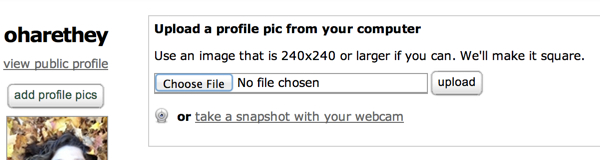
And that’s it! Now you have a Ravatar to represent you all over the site! I like to choose a picture of me smiling because I feel like it makes my posts sound friendlier. Have fun picking something to represent you!
And for those of you that already have a Ravatar, here are some bonus tips. Did you know that you can manage your existing Ravatars when you’re editing your profile? Follow steps 1 & 2 above to edit and from there you can remove any Ravatars you don’t want and drag and drop to reorder your gallery of previous profile pics. I like keeping previous ones around so I can switch quickly if I feel like changing it up.
Community Eye Candy: Bunting Beauties
June 24th, 2014
I really love bunting. It is such fun, crafty decor! This week I want to highlight some bunting that caught my eye.

First up, some floral flags. From left to right: hddod‘s Flower garland, Meredith0908‘s Half Lotus Bunting, and Claire-clutterbug‘s Daisy Chains.

Next, I love these bundles with names and words. Clockwise from top: shopaholiccat‘s playhouse bunting, -amanda75-‘s Van Bunting, and sandpipers‘ A Room of His Own.

Finally, some patriotic bunting from around the world. Clockwise from left: aahhh‘s Jubilee Bunting, koleslaw12‘s Star Spangled Banner, and Zoomsnoren‘s Flagranke.
I hope you enjoy these fantastic flags as much as I do!
Thursday Tip: What Do I Do With That Skein? Part 2
June 12th, 2014
It’s time for another round of “What Do I Do With That Skein?”, the blog post series that helps you get from cherished skein to beloved finished object. Last month I posted about looking at projects made from a specific yarn. Today’s focus is going to be on finding the patterns that have a specific yarn as a suggestion.
To start, let’s go back to our handy yarn page tabs and check out the pattern ideas. (An example.)

On this page I see a listing of patterns that were designed for this yarn, and even examples of projects knit from it! The filters on this page allow me to narrow down the patterns to a single category, so I can focus my search.

For those of you who love the flexibility of the advanced search, you can perform the same one there. In the dropdown at the top of the screen there’s a filter called “Suggested yarn name” – filling that out will pull up patterns designed for that yarn. Then you can sort, filter, and peruse those results to your heart’s content! (Again, an example.)

I hope you’re enjoying this series and that you’re finding the inspiration to cast on your favorite yarns!
Community Eye Candy: Worth the Wait!
May 27th, 2014
Do you have a project that you started ages ago and is hiding in a closet somewhere? Or maybe a long-term project you’ve been working on for years? Well the projects in today’s eye candy used to be long-term unfinished objects, but now they are done and they were worth the wait!

First, the sweaters! quiltmomoffive‘s Hex Coat, ckknitter‘s De Colores, and Poetmom‘s World’s Longest Fair Isle Project (at nearly 20 years, she is probably close to holding that record!).

And the blankets! makkidi‘s OUR Lizard Ridge, Violiknit‘s Blanket Freelancing, and januaryone‘s Madness.

And the other stuff! DinosaraKnits‘ Inga Hat, yarnRx‘s Vacuum hose ‘hose’…, and EvilOlive‘s Twisted Flower Sock.
My favorite part of finding all these projects was reading the notes – so many of them detail year-long sagas to create these beautiful projects, capturing the inspiration and advice picked up along the way. I hope you enjoy them as much as I did!
Thursday Tip: What Do I Do With That Skein? Part 1
May 15th, 2014
Sarah talked last week about finding yarn substitution ideas for a pattern you’re excited about. Today, I want to talk about one of the ways you can go the opposite direction – find a pattern when you have a skein you’re in love with.

At the top of any yarn page is a tab called “projects” where you can see all the projects made with that yarn. I love this for using other Raveler’s projects as inspiration. (Here’s an example.)

Right on this page you can filter these projects based on how other Raveler’s have rated them, the craft used, and lots more!

On the other side of the page are a series of buttons. Advanced search allows you to look at the projects made in this yarn with even more filtering options! The paired buttons control the look of the projects – the card view includes notes whereas the large is all photo eye candy. Both views highlight the pattern used for the project, so you can be gathering ideas for what you’ll make with your special skein.
This is just one way to find patterns to match a yarn. In future weeks we’ll show you some other ways to get ideas for the skeins in your stash (or soon to be there).
Community Eye Candy: Colorful Handspun!
April 30th, 2014
One of the most wonderful (and occasionally infuriating) things about spinning from dyed material is how much control you can have over the color of your final product. Today’s eye candy focuses on handspun featuring 3 color handling techniques.
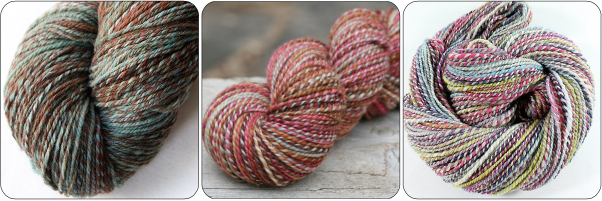
First up are the barberpoles. potentialofyarn‘s Hello Yarn Rambouillet, symonangel‘s Gift of Grace Handspun 2 ply, and SpunRightround‘s Olivia Mix.

Next, the gradient spins. fuzzylover‘s Elven Wine, mommato8‘s “Salted Camel Mochaccino”, and Eskimimi‘s Stormborn.

And finally, the fractals. Nordina‘s Karma, Lumpyjumperlady‘s Seascape, and squiished‘s All the Fun of the Fair.
I was able to find all these beautiful yarns by using the stash advanced search, using the handspun attribute filters. Want to see some yourself? Here are links to more barber poles, gradients, and fractals!
Thursday Tip: Sharing Is Caring
April 17th, 2014
We’ve posted previously about how to share your projects, but I’m going to cover it again because we have some new enhancements!
Let’s recap, how do I make something public again?
To share any item in your notebook, follow the steps below.

Neat! But I’ve seen all this before. What’s new?
Really, everything in your notebook. Fiber stashes are newly shareable!
A public page for all your public projects. The url for your project notebook – www.ravelry.com/projects/yourusername – shows all your projects to Ravelry users, and all your public projects to visitors who are not logged in. This page is a nice gallery to share what you create with friends and family who aren’t on Ravelry.

Social sharing! After you make an item public we give you the option to share it via social media or Ravelry private message.

I look forward to seeing what you share!
Community Eye Candy: Silly Hats
April 1st, 2014
It’s April Fools’ Day! We like to celebrate by giving you silly hats in the forums, so today’s eye candy will be about the silly hats you create!

First up, some crocheted beauties: honeyorange‘s MD’s Silly Monster Hat, dragonbird‘s Boba Fett’s Malendorian Helmet, and PlayinHooky‘s Along Came a Spider Halloween Beanie.

And check out these knitted ones: ByGumByGolly‘s Fox Isle, Narapoia‘s Fuzzy Rainbow Shapka, and dpwisnewski‘s Lucian’s winter dragon hat.

And finally, hats that make you look like an animal. How can you not love these? Malkyra‘s Chicken Hat, TheresaMarie1972‘s crawfish, and r-b‘s deer hat.
I hope you enjoyed these hats and that you enjoy the ones in the forums! (And if not, April Fools’ will be over tomorrow ;)
Thursday Tip: Blog Buttons and Printables
March 20th, 2014
Do you ever want to show off your Ravelry love, either electronically in real life? Today’s tip is about how you can do so using our Ravelry buttons and printables.


For the bloggers, check out this wiki page of Ravelry inspired works. You’ll find buttons featuring our logo, as well as blanks you can personalize with your username. Please do practice internet etiquette and take care to read the directions on which images you should upload to your own site.

If you’re looking for something to print and hand out in real life, this page is your best bet. These printables are cute and easy to personalize to advertise your group, LYS, or designs.
Want to use some of these great tools but have some questions? The blogging and non-ravelry technical help groups are great places to ask for a hand!


